Creating a bank transfer in euro or sterling
A Bank Transfer is the movement of funds from your Fire account to an external account of the same currency.
This may be another Fire user’s account, or an account held with another bank/payment service provider. Before making a bank transfer you must set up the payee – more on that here.
- Sign in to the Fire for Business web app and navigate to the the ‘Fire Accounts’ section.
- Choose the subaccount you wish to transfer the funds from. (For the purposes of this example, we want to create a bank transfer in EUR[€].)
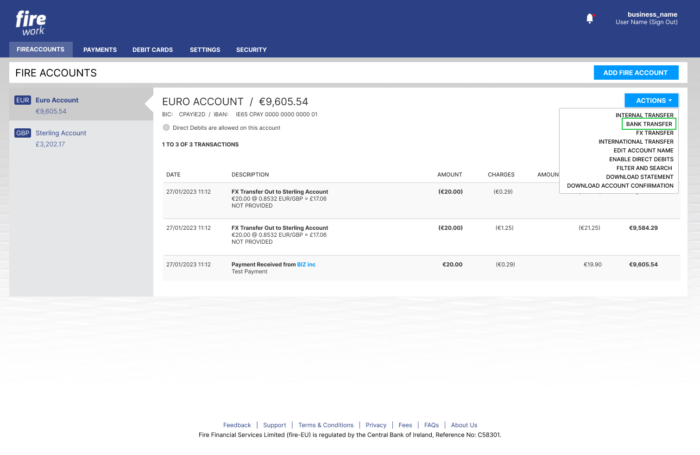
- Click the ‘Actions’ button and select the ‘Bank Transfer’ option from the list.
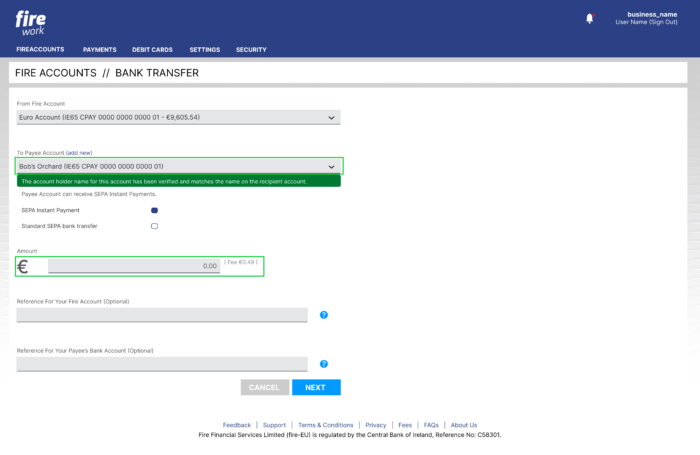
4. Ensure the destination account you wish to transfer from is correct. You can change this from the ‘From Fire Account’ drop down.
5. Choose the payee from the ‘To Payee Account’ drop down.
6. If you are making a euro transfer, you may see the option to choose between SEPA Instant {link to what is SEPA Instant FAQ}, where available, or SEPA standard. We will automatically select SEPA Instant for you if available, and you can choose the Standard option instead if you wish.
7. Enter the amount you wish to transfer, an optional reference for your records, and an optional reference to display in the recipient’s account.
8. Click the ‘Next’ button.
9. When you have reviewed the details, enter your Access Code and click the ‘Confirm’ button.
10. Once the Bank Transfer has processed successfully, you can view the outgoing transfer in the relevant account.